
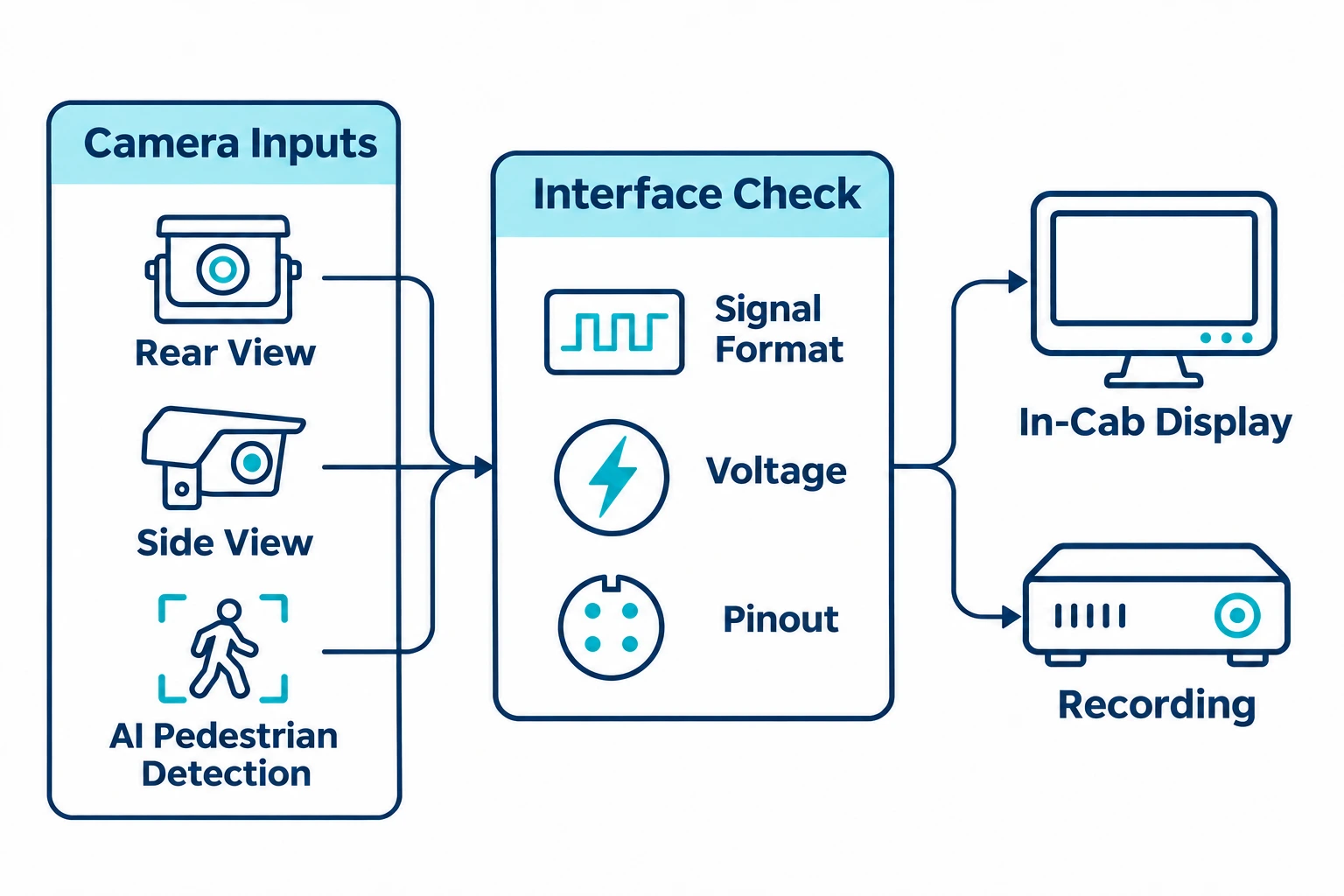
For fleet operators, commercial vehicle upfitters, and distributors, evaluating Brigade alternatives starts with the installation you need. Whether you are planning a new fleet installation, evaluating secondary suppliers, matching a project budget, or sourcing replacement components, compare proposed configurations against the same requirements.
Headline specifications—such as resolution or ingress protection ratings—are only part of that comparison. Two systems with similar camera specifications can differ in video signal formats, connector pinouts, supply voltage, and monitor trigger behavior.
This guide from SuperPower explains how to evaluate commercial vehicle camera alternatives: what Brigade offers, which technical and commercial factors to compare, and how to prepare for a configuration review and sample test.
On this page
Key Takeaways
- Decide what you need to replace. For a new installation, select the cameras, monitor and harness together. For a camera swap, start with the equipment you’ll keep.
- Verify electrical and video compatibility. Check video format, supply voltage and connector pinout against the retained monitor and harness.
- Match the system to the job. Specify whether you need live views, pedestrian alerts, recording or a combination.
- Compare quotes on the same scope. Check included cables, brackets and accessories, along with warranty and replacement support.
- Test a sample before ordering in volume. Check the agreed functions on the bench and on a representative vehicle.
01Define Your Functional Scope and Deployment Type
Before requesting quotes, separate the functions your vehicles need from how the equipment will be installed.
Functional Modules You Can Combine
- Rear-view and reversing monitoring: Cameras paired with an in-cab display help drivers view the area behind trucks, vans, and utility vehicles during reversing maneuvers.
- Side and front viewing: Additional cameras provide views of other blind spots. Specify the required camera channels, viewing modes, and any reverse or turn-signal switching.
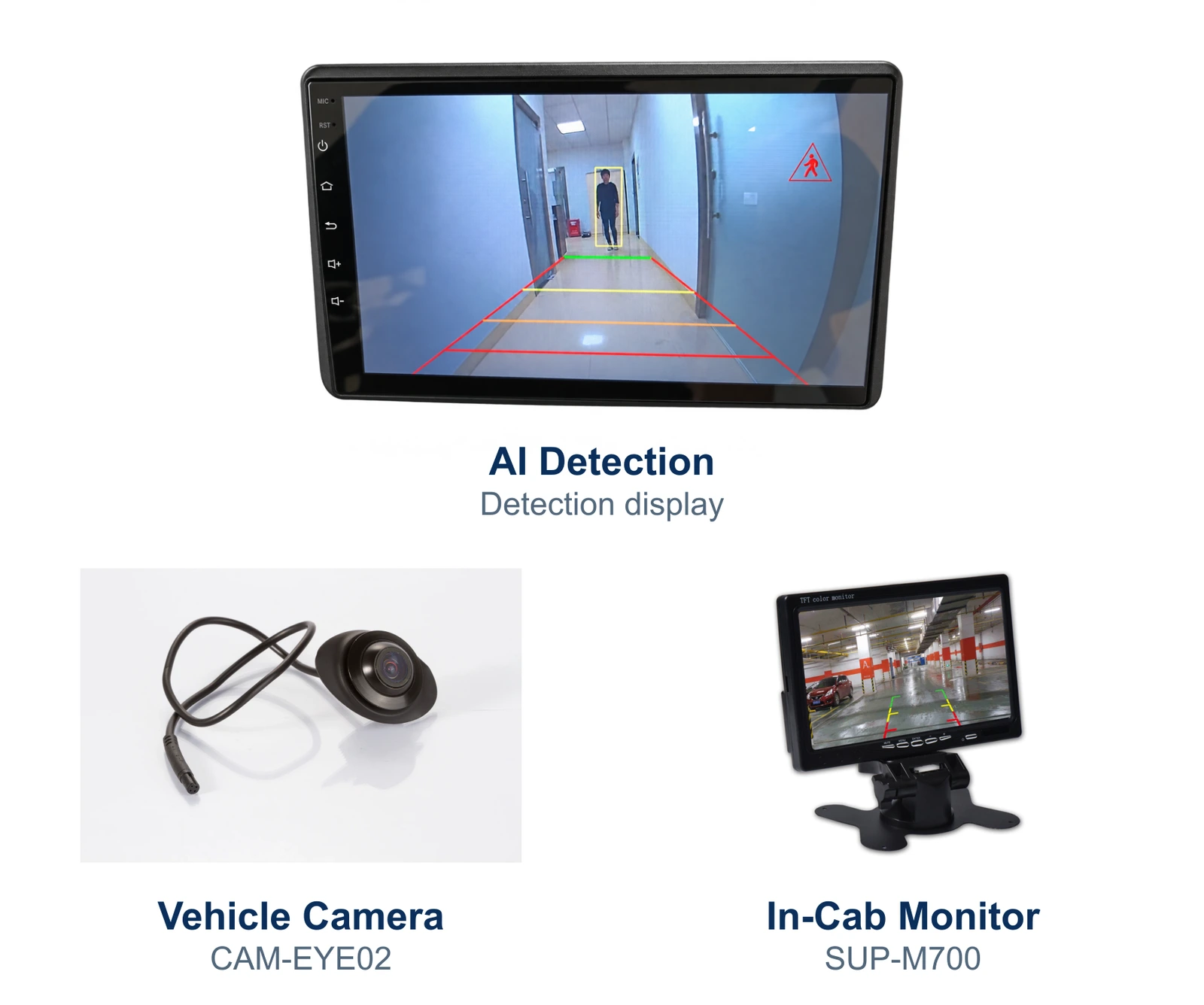
- AI pedestrian detection: A suitable camera system adds recognition of people within its monitored area and visual or audible alerts. Confirm the target types and alert functions of the specific model.
- Video recording and playback: Where footage is required, specify which camera views must be recorded, the retention needs, and how users will retrieve recordings. A viewing monitor alone does not establish recording capability.
Complete Installation or Component Replacement?
Swipe to compare installation types.
| Decision | Complete system installation | Camera-only replacement |
|---|---|---|
| Equipment scope | Select cameras, monitor, wiring, and accessories together | Retain an existing monitor and some or all wiring |
| Information needed | Vehicle power, viewing positions, mounting space, cable routes, and required functions | Existing monitor model, supported video inputs, camera supply voltage, connector specification, and pinout |
| Main compatibility task | Check the proposed components together and against the vehicle | Establish compatibility with the retained equipment |
| Sample evaluation | Assess the complete proposed installation | Test the candidate camera with the actual retained monitor and harness |
Identify the installation type in your first inquiry so suppliers can quote against the correct scope.
02What Does Brigade Offer?
A fair comparison starts with an accurate baseline. Brigade's camera systems include conventional camera-monitor products and surround-view systems. Its AI human form recognition range adds pedestrian detection and driver alerts, while its recording range includes mobile recording products and dashcams.
Because Brigade offers both conventional viewing and AI detection, buyers should compare specific proposed models, configurations, and support terms. Decide which functions your project requires before judging whether another supplier offers a suitable alternative.
03How to Compare Brigade Alternatives
Use the same requirements when reviewing each supplier's proposal.
Video Signal and Monitor Behavior
Confirm the camera's output format and the monitor's supported inputs, including CVBS or AHD and the applicable resolution and frame rate. For digital systems, confirm the interface and supported protocols as well.
Where required, check split-screen views, brightness controls, and reverse or turn-signal trigger priorities. Verify those functions on the proposed monitor rather than assuming they follow from the number of inputs.
Detection Capabilities and Alert Logic
If your specification includes active alerts, clarify what targets the camera is designed to detect, how warning zones are configured, and what the driver sees or hears. Include the alert hardware in the quoted configuration.
Our guide to AI pedestrian detection cameras versus traditional backup cameras explains the difference between live viewing and recognition-based alerts.
Connectors, Pinouts, and Power Requirements
Even when connectors have the same pin count, their physical fit and assignments for power, ground, video, and other signals may differ. Check the connector specification and wiring diagram for the proposed configuration.
Check operating voltage and polarity for each component, including how the camera receives power. Do not infer the camera's supply requirements from the vehicle battery voltage alone.
Complete Bill of Materials
Check what is included in the quotation: cameras, mounting brackets, any sunshields, extension cables and their lengths, monitor harnesses, and any required power adapters or alert devices.
Compare the total cost of the required configuration, including installation parts, so each supplier is quoting the same scope.
Warranty, Documentation, and Replacement Support
Confirm warranty terms, sample and repeat-order lead times, wiring documentation, and the process for technical troubleshooting and replacement parts. Ask who will support the installer if an integration question arises during rollout.
04When to Consider SuperPower
Consider SuperPower when you are sourcing rear-view or side-view cameras, in-cab monitors, or an AI detection backup camera for a commercial vehicle project. Start with the required viewing positions and functions, then compare the specifications of the proposed models.
For a complete installation, request a configuration listing the cameras, monitor, cables, power requirements, and included accessories. This gives your installer a defined package to assess against the vehicle and wiring layout.
For a camera-only replacement, include the existing monitor model, video format, supply voltage, and connector documentation in your inquiry. These details provide the starting point for assessing a candidate camera.
05What to Check Before Ordering Samples
Before approving batch orders, evaluate sample configurations on the bench and on representative vehicles.
Information to Prepare for Your RFQ
- Vehicle and environment: Vehicle type, planned mounting positions, and operating conditions.
- Installation scope: Complete kit or component replacement, with details of any retained equipment.
- Functions: Rear or side viewing, camera channels, viewing modes, recording needs, and any AI detection requirement.
- Power and wiring: Available supply voltage, required cable lengths, connector specifications, and any existing wiring diagrams.
- Quantity and timing: Sample configurations, expected rollout quantity, and required delivery dates.
Sample Acceptance Checks
- Power and image: Using a supply within each component's specified range, check startup, image orientation, clarity, and performance under the lighting conditions relevant to your operation.
- Viewing and triggers: Where supported, check reverse and turn-signal switching, viewing modes, and trigger priorities against the agreed requirements.
- AI alerts: Where applicable, evaluate detection and warnings at the planned mounting position under controlled conditions. Check audibility in the cab and record missed or unwanted alerts. Keep personnel clear of moving vehicles during evaluation.
- Recording: Where included, check the required camera views, playback, and footage export.
- Physical installation: Check bracket fit, cable routing, connector sealing, and strain relief. Visual inspection alone does not verify an ingress protection rating.
Record the tested models, settings, mounting positions, and any limitations so the batch order can reference the evaluated configuration.