

Explore Camera Options for Your Truck
For box-body deliveries, loading-dock reversing or tractor–trailer projects, choose the required view first. The products below are selection candidates, not a confirmed installation bill of materials.
- Camera and display. Match the exact camera output to each monitor or recorder input. AHD/CVBS labels and matching connectors alone do not establish compatibility.
- Power and cable path. Check every component against the truck supply, connector pinout and proposed cable length. Include trailer connections, movement and cable protection in the review.
- Retrofit brief. Provide the truck type, body length, required views and photos of existing equipment labels and connectors. Confirm mounting and the useful view on a representative vehicle.
AHD/CVBS compatibility guideFleet project planningRequest configuration advice
Front
Assess a forward recording view separately from reversing visibility. Confirm recorder functions and the required view for the chosen mounting position.

Matching products
 071080P Wi-Fi Dash CameraSUP-DVR30Basic vehicle recording option
Interior
Choose a display around accepted camera signals, input count and cab space. The optional AI entry is an in-cab warning view from an external rear camera, subject to project evaluation.

Matching products
 017-inch TFT LCD Vehicle MonitorSUP-M7007-inch vehicle monitor
 014.3-inch Rear-View Mirror MonitorSUP-M043Mirror monitor071080P Wi-Fi Dash CameraSUP-DVR30Recording camera
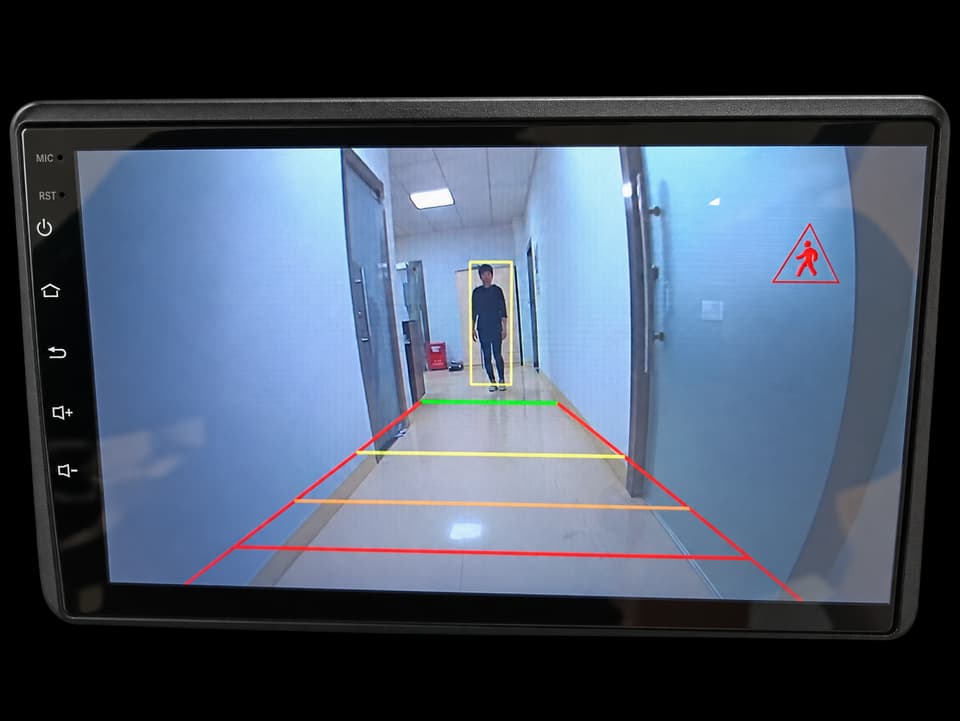 01AI Pedestrian & Vehicle Detection Backup CameraIn-cab AI warning view; validate the external rear camera and video signal.
Side
For side clearance and low-speed manoeuvring, compare mounting space and useful coverage on the target vehicle. A viewing camera alone does not provide automatic detection.


Rear
For reversing and loading-area visibility, review camera angle, rear-door movement and the cable path. Tractor–trailer projects also need connection and articulation checks.

Matching products
 02CAM-078 Universal Backup CameraCAM-078Rear-view camera
 02CAM-D05 Universal Backup CameraCAM-D05Low-profile rear-view camera
 02HD Universal Car Backup CameraCAM-B09Adjustable bracket rear camera
 02Universal Bus & Truck CameraCAM-BT01Bus and truck rear-view camera
 02CAM-EYE02 Front, Rear & Side View CameraCAM-EYE02Compact multi-view camera; rear installation to be confirmed.
Plan a Camera System for Your Truck
Share the truck type, body length, required views, supply voltage and quantity. For a retrofit, include camera and monitor references, connector photos and the proposed cable route so we can review a configuration before you order.